#272 Error - Cannot insert link

Posted in ‘EasyBlog’
This is a public ticket

Everybody will be able to see its contents. Do not include usernames, passwords or any other sensitive information.

Latest post by basfas on Thursday, 04 June 2026 16:37 UTC

basfas

Hello,

when trying to insert a link, it doesn't advance and I have the error from the images. Installation on Joomla 6.1, I have the compatibility plugin activated (without it the site gives an error).
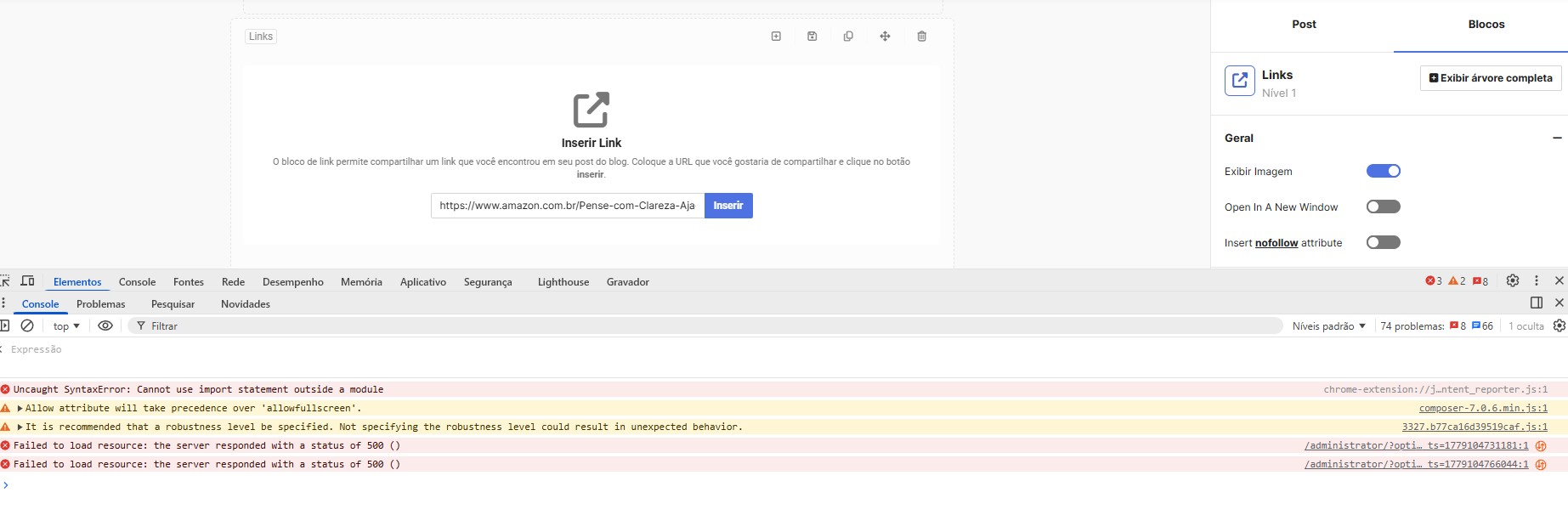
error_link.jpg

Uncaught SyntaxError: Cannot use import statement outside a module
composer-7.0.6.min.js:1 Allow attribute will take precedence over 'allowfullscreen'.
buildFragment @ composer-7.0.6.min.js:1
3327.b77ca16d39519caf.js:1 It is recommended that a robustness level be specified. Not specifying the robustness level could result in unexpected behavior.
requestMediaKeySystemAccess @ 3327.b77ca16d39519caf.js:1
/administrator/?option=com_easyblog&lang=&_ts=1779104731181:1 Failed to load resource: the server responded with a status of 500 ()
/administrator/?option=com_easyblog&lang=&_ts=1779104766044:1 Failed to load resource: the server responded with a status of 500 ()


thanks

CreativeGraphics Support

Hi Jarbas

On our testhost as well as on the live-sites we administer, it works without issues/flaws.

link.png

We cannot reproduce the error on our testhost. 

Most likely causes of this issue:

- allow_url_fopen or cURL is disabled on your server / outbound HTTP requests are blocked, which results in an error 500
- php-curl extension not installed
- open_basedir restriction: blocks the file read that the link handler needs

The error 500 is a serverside issue, the JS error will disappear once the AJAX response is valid.

Have a nice day.

Best regards, Pascal

basfas

Hi,

I tested it with other links and it actually worked.

The error occurs with an Amazon link (below)...could there be any restrictions?

link: Pense Com Clareza E Aja Com Foco eBook : Villagra, Marta Marques: Amazon.com.br: Livros

CreativeGraphics Support

Hi, I retested with the link you provided and can confirm, that the crawler was not working with .com.br 

I refactored the crawler.php to make it more stable and gracefully fail when an exception happens. 

The fix will be included in the upcoming Blog release next monday.

Best regards, Pascal

basfas

thanks!