EasyBlog comes with a list of pre-defined module positions out of the box. These module positions are pretty similar to your Joomla template's module position. You can place any module that you want within the component itself.
Below are the list of available module positions available to use:
Sitewide
The following module positions are available throughout the entire extension provided that the heading of the component is enabled:
Before Toolbar (
easyblog-before-toolbar)
Modules that are placed in this position would appear before EasyBlog's toolbar.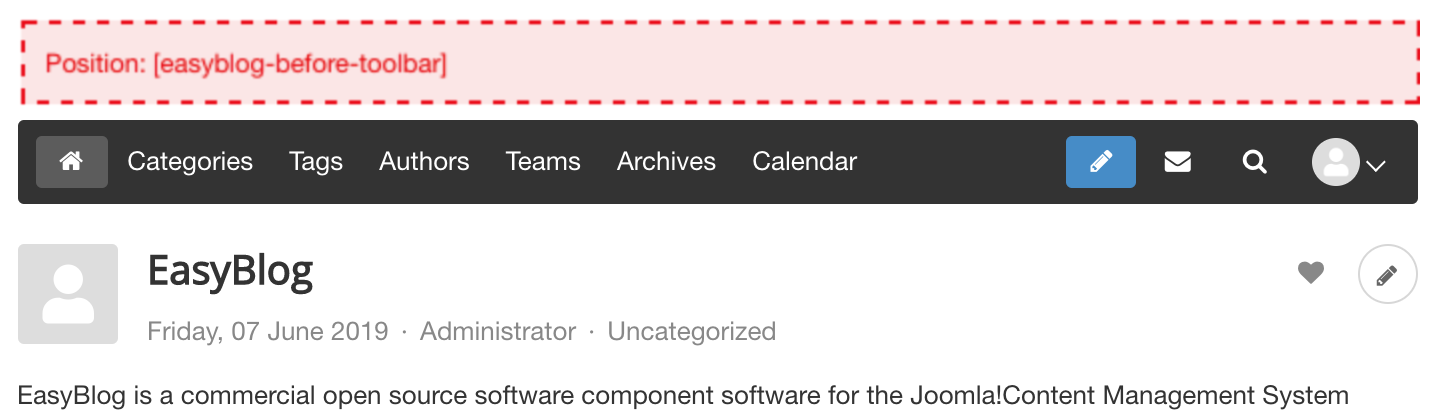
After Toolbar (
easyblog-after-toolbar)
Modules that are placed in this position would appear after EasyBlog's toolbar. If you have disabled the toolbar, it will still appear before the toolbar.


Listings
These are the available module positions on standard listing layouts. Standard listing layout includes the front page layout, single author layout, single category layout, single tag layout and single team blog layout.
Before Entries (
easyblog-before-entries)
Modules that are placed in this position would appear before the entries listing.
To use this module position: type the position title easyblog-before-entries when editing module.
After Entries (
easyblog-after-entries)
Modules that are placed in this position would appear after the entries listing.
To use this module position: type the position title easyblog-after-entries when editing module.
Before Pagination (
easyblog-before-pagination)
Modules placed in this position would appear before the pagination.
To use this module position: type the position title easyblog-before-pagination editing module.
After Pagination (
easyblog-after-pagination)
Modules placed in this position would appear after the pagination.
To use this module position: type the position title easyblog-after-pagination when editing module.


Entry
These are the available module positions when you view a single entry layout
Before Entry (
easyblog-before-entry)
Modules that are placed in this position would appear before the post title.
To use this module position: type the position title easyblog-before-entry when editing module.
Before Post Content (
easyblog-before-content)
Modules that are placed in this position would appear before the content of the post.
To use this module position: type the position title easyblog-before-content when editing module.
After Post Content (
easyblog-after-content)
Modules that are placed in this position would appear after the post's content.
To use this module position: type the position title easyblog-after-content when editing module.


Custom Module Position
To set a custom module position in Joomla, all you need to do is to type the name of the position under the position section as shown in the screen shot below:
